

Go to Home


Five Nights at Freddy's: Afton's Nightmare
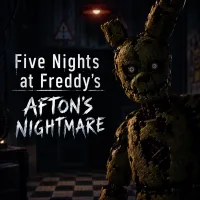
Five Nights at Freddy's: Afton's Nightmare
Sprunki Phase 8
Eyes: The Horror Game

Poppy Playtime 5

Bendy and the Ink Machine

5 Nights at Timokha's

Momo Horror Story

Five Nights at Freddy's 9

One Night at Flumpty's

FNAF: Creepy Night at Freddy's

FNAF Strike Halloween

FNAF Bartender
FNAF Animatronics Battle: Playground
Five Nights at Fulp's
Sprunki Phase 2

Five Nights at Sonic's 2

Five Nights at Osaka's
Five Nights at Freddy's: Afton's Nightmare is a fan-made survival horror experience inspired by the FNAF universe. The game places players in a dark environment where unsettling sounds and unpredictable animatronics create constant tension. Its combination of surveillance, exploration, and hiding gives each encounter an uneasy atmosphere.
HOW TO PLAY FIVE NIGHTS AT FREDDY’S: AFTON’S NIGHTMARE
Five Nights at Freddy's: Afton's Nightmare focuses on surviving encounters with hostile animatronics while exploring a dangerous environment. Players can observe their surroundings through surveillance equipment and react when threats approach. Finding suitable moments to move or stay hidden is essential, turning each encounter into a tense test of awareness.
Watch the Security System
- Monitor different areas through the available camera system.
- Pay attention to changes in the monitored rooms.
- Use visual information to understand what is happening around you.
- Switch between views when you need a clearer picture of the environment.
Use Hiding Spots Wisely
- Look for places that can conceal your character.
- Hiding under the desk can help you avoid nearby threats.
- Remaining hidden limits your ability to observe the surrounding area.
- Choose your timing carefully before leaving a hiding place.
Face a Variety of Animatronics
- Several recognizable FNAF-inspired characters appear as threats.
- Golden Freddy and Circus Baby are among the reported animatronics.
- Their presence adds variety to encounters throughout the experience.
- Expect sudden scares when danger gets too close.
Controls
- Mouse: Look around the environment.
- Left Mouse Button: Interact with objects and elements.
- Point and Click: Navigate and interact with available features.
SIMILAR GAMES
Here are some suggestions for fans of FNAF: